
Q: If the email address is updated in Raiser's Edge, will the HubSpot primary email address get updated?
Yes. If you change the primary email address for someone in Raiser's Edge, the integration can automatically update the primary email address on the matching HubSpot contact.
Q: Do all the fields from Raiser's Edge sync to HubSpot?
No — only the fields included in the RaiserSync application sync. See the RaiserSync Reference & Planning Guide for the complete field list.
Q: Does the installation migrate all historical data from Raiser's Edge?
No. There is no historical data migration with the installation, or at any point, in the standard app. Historical data is best handled with an export/import strategy, ideally early on before donations begin syncing. A migration through the API can also be performed as a separate scope of work — reach out for details if that's of interest.
Q: What is the sync timing?
Standard
- Trigger: Webhooks from Raiser's Edge NXT.
- Timing: Near real-time — updates flow as soon as Blackbaud sends a webhook (e.g., new gift, updated constituent).
- Behavior: Creates or updates contacts and deals in HubSpot only when RENXT sends a new event. If no new gift or constituent change occurs, nothing syncs until the next event arrives.
Plus
- Trigger: Webhooks from Raiser's Edge NXT, plus a scheduled sync for marketing data.
- Timing: Same near-real-time behavior as Standard for gifts and constituent updates. Adds a scheduled sync every 3 hours that writes HubSpot marketing and engagement data into Raiser's Edge (e.g., email opens, website activity).
- Behavior: Updates HubSpot with Raiser's Edge data whenever gifts, constituents, or actions change. Writes HubSpot marketing data into Raiser's Edge every 3 hours, even when no new gifts exist.
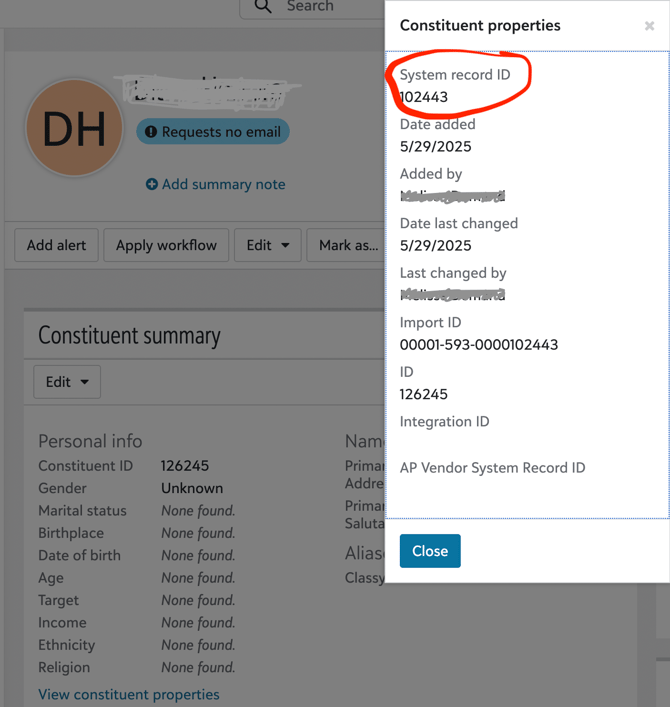
Q: What is the System Record ID, and why is it used for matching?
Every constituent in Raiser's Edge has more than one identifier:
- The Constituent ID (lookup ID) — the short, human-readable ID shown on the constituent's record in the RENXT web view and used in reports and exports.
- The System Record ID — Blackbaud's internal identifier for the record, used by the Blackbaud API.
RaiserSync matches records using the System Record ID because it is the identifier the Blackbaud API uses natively and it is immutable — it never changes for the life of the record. This makes it the most reliable key for keeping a Raiser's Edge record and its HubSpot counterpart correctly linked, even as the constituent's details are updated over time. The integration stores this ID on the HubSpot contact so that every future update is matched exactly, which is what prevents duplicate records for constituents the integration has already synced.
Note: If you update a primary email in Raiser's Edge and that email already belongs to a different contact in HubSpot, HubSpot may block the update to avoid creating a duplicate email. HubSpot's Duplicates tool can be used to resolve these cases.
Q: Which email address syncs as the primary email in HubSpot?
RaiserSync uses the Raiser's Edge email address marked as primary. In Raiser's Edge, email addresses are stored as a collection with exactly one entry where IsPrimary = true; RaiserSync maps that primary address to HubSpot's Contact Email field when creating or updating a contact. (If HubSpot rejects an address as malformed, RaiserSync preserves the original value in a separate property so no data is lost.)
Q: Does RaiserSync import Raiser's Edge relationships?
RaiserSync brings in constituents tied to gifts — even those without an email — because that information is needed for donation tracking. Standalone relationships (e.g., "Org A is a Member of Org B") are not synced: many involve records without emails or clear opt-in permission, and we avoid creating HubSpot contacts or companies without a clear way to engage them. Note that HubSpot will still auto-associate a contact to a company when the email domain matches, but RaiserSync does not pull in relationship data beyond gift connections.
Q: What web and email activity comes into Raiser's Edge from HubSpot, and where does it go? (Plus)
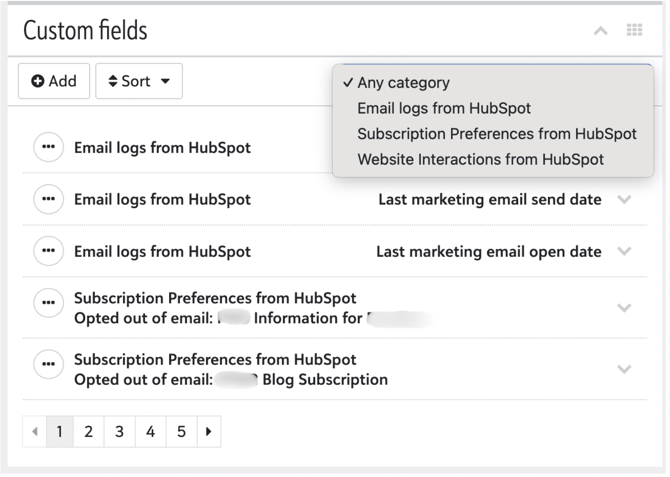
On the Plus plan, RaiserSync writes each contact's HubSpot email and website engagement data into Raiser's Edge as custom fields on the constituent record, on a 3-hour schedule. These fields are organized under separate Custom Field categories in Raiser's Edge — one for email activity and one for website activity — so the data appears directly on the constituent's record. (See the Reference Guide for the specific fields included.)
Q: Where does RaiserSync pick up Raiser's Edge communication preferences? Are those the same as solicit codes? How does this affect HubSpot permissions? (Plus)
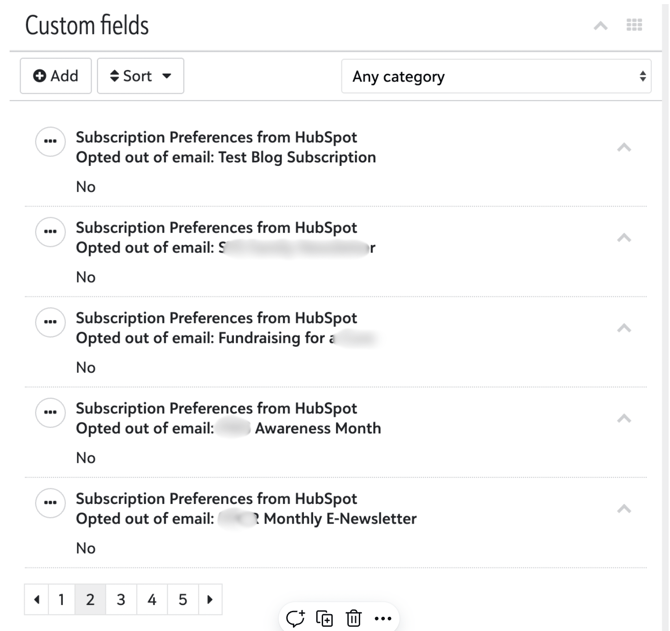
RaiserSync reads three do-not-contact preferences from Raiser's Edge — Do Not Email, Do Not Mail, and Do Not Call. These come from the do-not-contact flags on the constituent's primary email, primary address, and primary phone records, respectively (retrieved via the Blackbaud API). They reflect real permission choices and are not the same as solicit codes (e.g., "Newsletter," "Major Donor"), which are segmentation labels and don't control opt-in/opt-out.
They're pulled off the do_not_* boolean that sits on the constituent's primary email, primary address, and primary phone records respectively. So:
- Do Not Email comes from the
do_not_emailflag on the constituent's primary email (constituent.email.do_not_email). - Do Not Mail comes from the
do_not_mailflag on the constituent's primary address (constituent.address.do_not_mail). - Do Not Call comes from the
do_not_callflag on the constituent's primary phone (constituent.phone.do_not_call).
When syncing to HubSpot, each preference is written to its own custom property (rs_do_not_email, rs_do_not_mail, rs_do_not_call). RaiserSync does not overwrite HubSpot's built-in communication settings — such as Global Email Opt-out or subscription types — because HubSpot manages its own assets and may hold additional consent details (GDPR records, subscription preferences) that must remain intact. Overwriting them risks removing valid permissions or creating compliance problems.
Importantly, a Raiser's Edge opt-out doesn't automatically apply to every HubSpot communication — someone who is "Do Not Email" in Raiser's Edge may still want your HubSpot event invitations or program updates. To manage this well:
- Keep the fields separate — retain the Raiser's Edge preference flags in their custom properties to reference when building HubSpot lists, workflows, and reports.
- Create a permission matrix — define which communications live in Raiser's Edge (appeals, printed newsletters) and which live in HubSpot (marketing emails, SMS), so you honor each person's choices in both.
- Plan your marketing-communications strategy — decide how Raiser's Edge opt-outs should influence HubSpot campaigns (e.g., suppress someone from RENXT-originated appeals while still sending HubSpot event invites).
Q: Why do old gifts suddenly sync or update in HubSpot?
RaiserSync listens for real-time updates from Raiser's Edge. Occasionally you may see many older gifts or constituents appear as "updated." This does not mean new data was imported — it means many records were changed at once inside Raiser's Edge. Common causes:
- A Fund, Campaign, Appeal, or Gift Type was edited — renaming a shared value updates every gift linked to it, even decades-old gifts, firing a burst of "gift updated" events.
- A bulk edit or Global Change was run — RENXT's Global Change or batch tools (adding a field to many gifts, updating attributes/codes, Query → Update) fire an update event per affected record.
- Constituent merges or mass updates — merging or bulk-updating constituents can touch connected gifts.
- Webhook backlog or reconnection — if webhooks were delayed, paused, or disconnected, queued updates release all at once when the integration reconnects.
- RENXT system maintenance — Blackbaud background processes can refresh "last modified" timestamps, firing update events without user edits.
In all cases, RaiserSync only syncs what Raiser's Edge marks as newly created or updated — it doesn't modify historic data on its own. If you see an unexpected spike: check with your RENXT admins about recent global edits, look at a sample gift's "Last Updated" detail in RENXT, and contact us — we can confirm exact timestamps and help trace the source.